Covers Manual pp. 34–55 Manual pp. 84–87 Manual pp. 90–91 Manual pp. 96–97.
Events#
Everything on a map that does something is an event イベント: the people, but also the chests, doors, stairs, shop counters, signposts and the invisible triggers that start a scene or lead off the map. Even the field's towns and caves are events. They are made in Event Making イベントの作成 on the Edit menu, map by map, after the maps are drawn (Maps).
An event has a place, up to four pages, and on each page a look, a way of moving, a way of starting and a list of commands. The story is held together by 240 switches.
People and objects#
An event is one of two kinds Manual pp. 36–37:
- A person ひとイベント is a walking figure, drawn from the 72 character graphics (people, animals, monsters). Only a person faces a direction, moves about, and can be turned, moved, spun or made to blink by commands.
- An object ものイベント is a thing that stays put: a chest, a door, a staircase, a pot, a bed; on the field a town, a castle or a cave. Its graphic is drawn into the map like a part of it. There are 68 object graphics for dungeon maps and 22 for the field Guidebook pp. 70–71.
Graphic 1 is transparent for both kinds. An invisible event is the usual way to make a trigger: a shop counter that answers when spoken to, an exit along a map's edge, the start of a scene. The R menu's しゅるいへんこう turns a person into an object or back. The graphics are drawn in the catalogue and object graphics.
Placing an event#
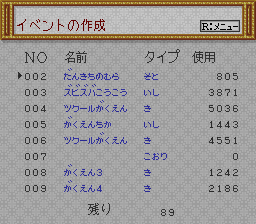
Event Making opens on a list of the maps, each with the bytes its events take; the figure at the bottom is what is left for the whole game (Costs and limits). Choose a map and a cursor one screen in size moves over it; choose a screen, and a cell cursor picks the cell for the event Manual pp. 36–37.
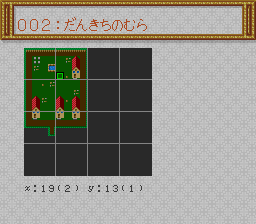
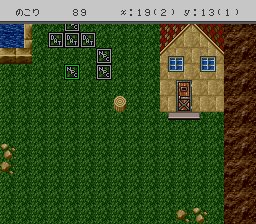
Positions in the editor count cells from 1.
Pages and their conditions#
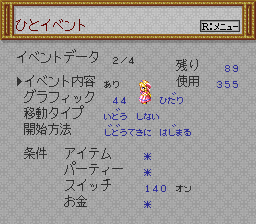 1234567891011121314
- 1 Person event ひとイベント a person (moves, faces); an object event is ものイベント
- 2 R menu R:メニュー here only しゅるいへんこう: change person to object or back
- 3 Page イベントデータ 2/4 one of four pages, left and right to change; the highest whose conditions hold runs
- 4 Bytes left 残り 89 of the map's 12,288 or the 43,960 pool, whichever is less
- 5 Bytes used 使用 355 this event's size
- 6 Contents イベント内容 あり the page has commands (なし: none); A opens the list
- 7 Graphic グラフィック 44 a character graphic for a person, an object graphic for an object; 1 is transparent
- 8 Graphic and facing ひだり the graphic as it stands, and its facing: down, right, up or left
- 9 Movement type 移動タイプ いどう しない stand still, random, side to side, up and down, approach, flee, stepping, blinking
- 10 Start method 開始方法 じどうてきに はじまる touch, talk, search, automatic (repeats) or a key A-D used
- 11 Item condition アイテム * an item the party holds (* none); conditions are on pages 2-4 and all must hold
- 12 Party condition パーティー * heroes who must all be in the party
- 13 Switch condition スイッチ 140 オン a game switch (1-240) that must be on
- 14 Gold condition お金 * gold of at least this much
Each event has four pages イベントデータ 1/4 … 4/4. Every page has its own graphic and facing, movement, start method and commands, so one event can look and behave quite differently as the story goes on: a villager with something new to say, a chest that is empty once opened, a door that is open once unlocked.
Pages 2, 3 and 4 have conditions 条件, up to four, and a page counts only when every condition set on it holds Manual pp. 34–35 Guidebook pp. 62–63:
- Item: the party carries the item, or a hero has it equipped.
- Party パーティー: every hero ticked (of the 12) is in the party.
- Switch: the switch (1–240) is on.
- Gold: the party has at least this much.
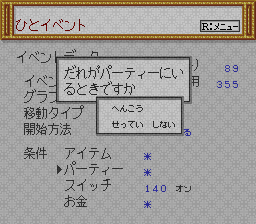
The highest page whose conditions hold is the one in force: page 4 is tried first, then 3, then 2, and page 1, which has no conditions, is used when none of them holds. The choice is made again whenever the map is entered and after each event has run, so a switch turned on in one event can change every other event on the map at once.
A page left blank costs nothing, and an event may start at page 2. The sample's kidnappers have no page 1 at all, only a page that waits for a switch: they turn up when the story needs them.
The graphic and facing#
A page's graphic is a number: 1–72 for a person (the walking figures, numbered as in the catalogue), or an object graphic. A person also faces down, right, up or left. An object's graphic changing between pages is how a chest opens or a door swings back.
Movement#
A person's page has one of eight movement types 移動タイプ Guidebook pp. 70–71. Objects never move.
| Movement | On screen | What the person does |
|---|---|---|
| Stays | いどう しない | Never moves |
| Random | ランダム | About every 1.3 seconds, takes a step in a random direction |
| Back and forth | よこに おうふく | Walks right, and turns back when something is in the way |
| Up and down | たてに おうふく | Walks down, and turns back when something is in the way |
| Approaches | しゅじんこうに ちかよる | Steps toward the hero, along the longer of the two distances first |
| Flees | しゅじんこうから にげる | Steps away from the hero until it is cornered |
| Treads | いどうしない(あしぶみ) | Stays, walking on the spot |
| Flickers | いどうしない(てんめつ) | Stays, flickering on and off |
A moving person decides about every 80 frames and is stopped by walls and by other people. The approaching and fleeing types follow the party's leader.
Start methods#
The start method 開始方法 decides what sets the page off.
| Start | On screen | The page runs when | The sample uses it for |
|---|---|---|---|
| Touch | しゅじんこうと ふれたとき | The hero walks onto the event's cell (or into a person) | Stairs, doorways, map exits, the field's towns |
| Talk | はなす のとき | The player chooses Talk facing the event from the next cell, on foot; a person turns to face the hero | People, shop counters, save points |
| Search | しらべる のとき | The player chooses Search standing on the event, or facing it | Chests, drawers, locked doors |
| Automatic | じどうてきに はじまる | At once, when the page becomes the event's page; it runs again for as long as it stays chosen | Story scenes, the opening |
| Key | かぎ を つかったとき | The player uses a key item of the same letter (A, B, C or D) facing the event | Not used by the sample |
An automatic page runs again as soon as it ends, for as long as it is the page in force Manual pp. 42–43. So every automatic page must change what chose it: turn off the switch that brought it in, turn on a switch for a higher page, or make the event vanish. One that doesn't repeats forever, and the player can do nothing but reset. Every automatic page in the sample ends by turning its own switch off.
Keys: an item of the kind "key" carries a letter A–D (Items). Used facing an event whose start method is that key, it starts the page; any other key, or none, says it can't be used here.
The commands#
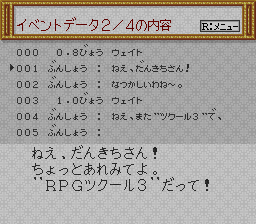
A page's commands run from the top, one after another. They are chosen from a picker of 40 commands on five pages of eight Manual pp. 48–55 Guidebook pp. 130–131:
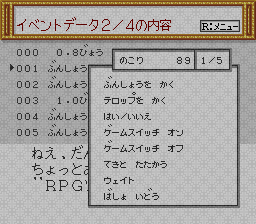
| Page | Command | On screen | What it does | Settings | Bytes |
|---|---|---|---|---|---|
| 1 | Message | ぶんしょうを かく | Shows text in a window; the page waits until the player closes it | Up to 4 lines of 14 characters | 2, + 1 a character, + 1 a line |
| 1 | Caption | テロップを かく | Text that scrolls up the screen from the bottom | Lines of text | 2, + 1 a character, + 1 a line |
| 1 | Yes / no | はい/いいえ | Asks the player yes or no about the message above it, and splits the rest of the page into a yes branch and a no branch | 2 (1 a branch) | |
| 1 | Switch on | ゲームスイッチ オン | Turns a switch on | Switch 1–240 | 2 |
| 1 | Switch off | ゲームスイッチ オフ | Turns a switch off | Switch 1–240 | 2 |
| 1 | Battle | てきと たたかう | Fights a fixed group; the party can't run away. A win carries on with the page, a defeat ends the game | One kind (field, dungeon or event enemies), up to 4 of them, the BGM | 6 |
| 1 | Wait | ウェイト | Pauses the page | 0.1–25.5 seconds | 2 |
| 1 | Warp | ばしょ いどう | Fades out, moves the party, fades in; the page goes on at the new place | The field or a map, x, y | 4 |
| 2 | Item + | アイテムが ふえる | Puts one of an item in the bag | Item | 2 |
| 2 | Item − | アイテムが へる | Takes one of an item from the bag | Item | 2 |
| 2 | Experience + | けいけんちが ふえる | Gives the amount to every hero in the party, then shows any level-ups and new spells | 1–9,999,999 | 4 |
| 2 | Inn | やどや | Offers a night's stay: for the price, every hero's HP and MP are filled (poison and paralysis stay) | Price | 3 |
| 2 | Shop | おみせ | Opens a shop that sells these items and buys anything sellable | Up to 8 items | 9 |
| 2 | Save point | セーブ ポイント | Opens the save window: the only way to save on a map | 1 | |
| 2 | Gold + | おかねが ふえる | Adds gold (the purse holds at most 999,999) | 1–999,999 | 4 |
| 2 | Gold − | おかねが へる | Takes gold, never below 0 | 1–999,999 | 4 |
| 3 | BGM | BGM へんこう | Plays a song in place of the map's; it lasts beyond the event | Song 0–30 | 2 |
| 3 | Sound | おとを ならす | Plays a sound effect | Effect 1–65 | 2 |
| 3 | End event | イベントしゅうりょう | Ends the page at once | 1 | |
| 3 | Event faces | イベントの むきを かえる | Turns the event (a person only) | Up, right, down or left | 1 |
| 3 | Event moves | イベントの いどう | Moves the event (a person only) one cell | A direction; walking, keeping its facing, or without its stepping animation | 1 |
| 3 | Event blinks | イベントの てんめつ | Flickers the event (a person only), then leaves it shown | 0.1–25.5 seconds | 2 |
| 3 | Event spins | イベント まわる | Spins the event (a person only) a full turn | Left or right | 1 |
| 3 | Event vanishes | イベント きえる | Takes the event off the map until the map is next entered; the rest of the page still runs | 1 | |
| 4 | Hero HP + | しゅじんこうのHPふえる | Restores HP to every hero in the party, up to each one's maximum | 0–9,999 | 3 |
| 4 | Hero HP − | しゅじんこうのHPへる | Takes HP from every hero, but never below 1: an event can't kill | 0–9,999 | 3 |
| 4 | Hero MP + | しゅじんこうのMPふえる | Restores MP to every hero, up to the maximum | 0–9,999 | 3 |
| 4 | Hero MP − | しゅじんこうのMPへる | Takes MP from every hero, never below 0 | 0–9,999 | 3 |
| 4 | Hero joins | しゅじんこうを くわえる | Adds a hero to the end of the party; does nothing if the party has four or the hero is in it | Hero 1–12 | 2 |
| 4 | Hero leaves | しゅじんこうを はずす | Takes a hero out of the party; the line closes up | Hero 1–12 | 2 |
| 4 | Hero faces | しゅじんこうの むきを かえる | Turns the party | Up, right, down or left | 1 |
| 4 | Hero moves | しゅじんこうの いどう | Walks the party one cell, as if the pad were pressed | Up, right, down or left | 1 |
| 5 | Poison | しゅじんこうに どくをかける | Poisons every hero in the party | 1 | |
| 5 | Paralyse | しゅじんこうを マヒ | Paralyses every hero in the party | 1 | |
| 5 | Cure | しゅじんこうの どくとマヒなおす | Cures poison and paralysis in every hero | 1 | |
| 5 | Flash | がめん フラッシュ | The screen flashes white for a moment | 1 | |
| 5 | Shake | がめん ゆらす | The screen shakes for about a quarter of a second | 1 | |
| 5 | Screen colour | がめんの色を かえる | Fades the screen to a tint, to black, or into a mosaic; it stays (and is saved with the game) until put back | One of 14 (below) | 1 |
| 5 | Colour back | 色とモザイク もとにもどす | Fades the colour back to normal and clears the mosaic | 1 | |
| 5 | Ending | エンディングに いく | Fades out and rolls the credits: the game's own, then RT2's staff roll; then back to the opening demo | The BGM | 2 |
Commands that take no time (a switch, an item, gold) run together in an instant; a message, a step, a wait or a fade holds the page until it is done. The sections below say more about each group.
Messages and choices#
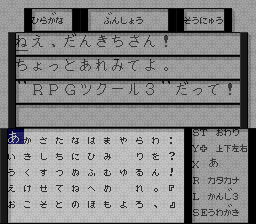
A message ぶんしょうを かく is up to four lines of 14 characters, typed on the editor's keyboard (the keyboard); a long speech is a run of messages, one window at a time. A caption テロップを かく rolls its lines up the screen instead, over whatever is shown: the sample's opening is fourteen captions on an otherwise empty one-screen map, run by one automatic event, with an invisible hero in the party until the story proper begins Manual pp. 84–87.
A choice はい/いいえ goes straight after the message that asks the question. It adds two markers to the page, yes and no: the commands between them run if the player says yes, the commands after the no run if the player says no. The yes branch ends at the no marker, and the no branch at the end of the page, so nothing can follow both: anything that must happen either way goes into both branches. A second question goes into the no branch, as the sample does when an elder offers to explain again.
Switches#
There are 240 switches, each on or off, and no variables Manual pp. 34–35. A switch does nothing by itself; it matters only because pages wait for it. The usual pattern is a chain: an event's last command turns on a switch, and the next event in the story has a page that waits for it.
In test play the switches can be set by hand from Settings (Test play), counting from 1 as the editor does.
Items, gold and experience#
Item + and item − put one of an item in the bag or take one out. Gold + stops at 999,999, and gold − at 0. Experience + gives the whole amount to every hero in the party, and at once shows any levels gained and spells learned.
Warps and vehicles#
A warp ばしょ いどう moves the party to a cell of the field or of any map. It fades out and back in by itself, and if the new map's music is different that starts. The page carries on after the warp, on the new map: the sample's well sets the music and a switch after jumping down.
No command gives the party a vehicle or puts it aboard. The three vehicles stand where Hero Settings puts them, and an item of the kind "call a vehicle" brings one to the party (Vehicles). The sample hands over its ship as a conch shell and its airship as a karaoke microphone.
Battles#
Battle てきと たたかう fights a fixed group of up to four monsters of one kind: field, dungeon or the 32 event enemies, which nothing else calls. It sets its own music. The party can't run from an event battle. A win goes on with the page, so the reward and the switch that moves the story on follow the battle command; a defeat is game over, as in any battle. The background is the map's (Battle backgrounds).
Shops, inns and saving#
- A shop おみせ sells up to eight items, one per press of A, and buys from the bag at half price anything that can be sold.
- An inn やどや names its price and, if the party stays, fills every hero's HP and MP. It cures neither poison nor paralysis Manual pp. 52–53.
- A save point セーブ ポイント opens the save window. On a dungeon map this is the only way to save: the field menu's Record works only on the field, on foot (Saving).
The party#
HP + and MP + restore every hero in the party, up to each one's maximum. HP − takes HP from all of them but never leaves anyone below 1: an event can't kill. Poison, paralyse and cure act on every hero in the party at once.
Hero joins puts a hero at the end of the party, unless the party already has four or the hero is in it; hero leaves takes one out. The sample keeps an empty, invisible hero for scenes in which its lead is kidnapped: he joins, the lead leaves, and back again afterwards. Hero faces and hero moves turn and walk the party as if the player had pressed the pad.
The event itself#
These work only on a person; the picker greys them out on an object.
- Event moves takes one step: walking, keeping its facing (sideways or backwards), or sliding without the stepping animation.
- Event faces turns it; event spins turns it all the way round, four quarter turns.
- Event blinks flickers it for 0.1–25.5 seconds and then leaves it shown.
Event vanishes イベント きえる works on either kind. It takes the event off the map, until the map is next entered: then it is back, with its page chosen afresh. The rest of the page still runs. To make something go for good, give it a page with a switch and a transparent graphic.
Screen effects#
Flash whites the screen for a moment; shake jolts it for about a quarter of a second. Screen colour fades the screen to one of fourteen states: brighter, darker, red, blue, green, yellow, purple, light blue, monochrome, sepia, all black, the ground black, a quick mosaic or a slow one. It stays until colour back 色とモザイク もとにもどす, and is even kept in a saved game, so a scene that darkens the screen must brighten it again.
Sound and music#
Sound plays one of the 65 effects, BGM one of the 30 songs (Music and sound). A song set by an event goes on after the event, and the manual warns that a battle puts back the song that was playing before it; a BGM command after the battle restores the scene's Manual pp. 52–53.
The ending#
Ending エンディングに いく fades out, plays its song and rolls the credits: one staff roll that opens with the game's scenario and map design lines from Title Settings, goes on with RT2's own staff, and puts the game's special-thanks line among RT2's own special thanks. It returns to the opening demo, and nothing is saved.
Costs and limits#
All of a game's events, the field's included, share 43,960 bytes, and the events of any one map may take at most 12,288 Manual pp. 96–97. Event Making's list shows what is left of the whole. A screen of the event editor, and each page, show what is left for the map: 12,288 less what its events use, or what is left of the whole if that is less. The page also shows the event's own size.
- An event costs 5 bytes, with nothing on it.
- Page 1 adds 4, and each page 2–4 adds 11 (its conditions included).
- Each command adds the bytes in the commands table: most 1 or 2, a battle 6, a shop 9. A message or caption costs 2, plus 1 for every character, plus 1 for every line.
So the sample's staircase (a sound and a warp) costs 15 bytes, its treasure chests about 77, the debtor who sells his ship 867, and its largest event, the sister who reads the manual aloud, 1,828.
| What | Limit | Where it shows |
|---|---|---|
| Event memory, the whole game | 43,960 bytes | Event Making's list, 残り |
| Event memory, one map | 12,288 bytes | A screen of the event editor, のこり |
| People on a map | 26 (16 on the field) | The books Manual pp. 90–91 Guidebook pp. 130–131 |
| Objects on a map | 80 (50 on the field) | The books |
| Pages an event | 4 | |
| Commands a page | 1,023 bytes | Set by how a page is stored; not tried in the editor |
| Switches | 240, on or off; no variables | |
| Enemies in an event battle | 4, of one kind | |
| Items in a shop | 8 |
The sample game fills the memory: its events take 43,871 of the 43,960 bytes, leaving 89. Loading it into the editor to study is fine; to make your own game, start from an empty one.
How the sample does it#
The sample game, だんきちのバクチンだいさくせん, is the best pattern book there is (The sample game): 456 events over 22 maps and the field. Here are six of its common pieces, read from its events. Load it from Data to look at them in the editor.
Doors, stairs and ways out#
In Tamayo's cave, every staircase is an object with a stairs graphic, starting on touch, with two commands: a sound (effect 45, ) and a warp onto (or beside) the matching staircase elsewhere, on the same map or the next. Each pair of stairs is two such events, each warping to the other. A party arriving on a staircase by warp doesn't set it off; it starts only when the hero steps onto it.
The way out is two invisible objects side by side at the cave's mouth, touch, each warping to the field onto the cave's entrance. The entrance on the field is an object with a cave graphic: touch, a warp into the cave, then a BGM command that runs on arrival and starts the cave's own song.
Shops, inns and save points#
- A shop: in Dankichi's village the shopkeeper is a person with no commands at all, standing behind the counter. The shop is an invisible object on the counter, start talk: a message ("Take a lunch if you're going to school!") and a shop of five items. Talking across the counter reaches it, since talk reaches the next cell.
- An inn: Monja Town's inn is one object, talk, with a single command: inn, 60 gold. 12 bytes.
- A free bed: the bed at Dankichi's home is an object, touch. A message asks whether to rest; on yes: a sound (effect 65), screen darker, wait 2 seconds, HP + 9,999, MP + 9,999, cure, colour back, and a message that HP and MP are restored. Unlike the inn command it cures too.
- Save points are cats: a person, random movement, talk. A message ("Nyanyanyanya~n ♪") and a choice; yes runs save point, no shows a second message.
A treasure chest#
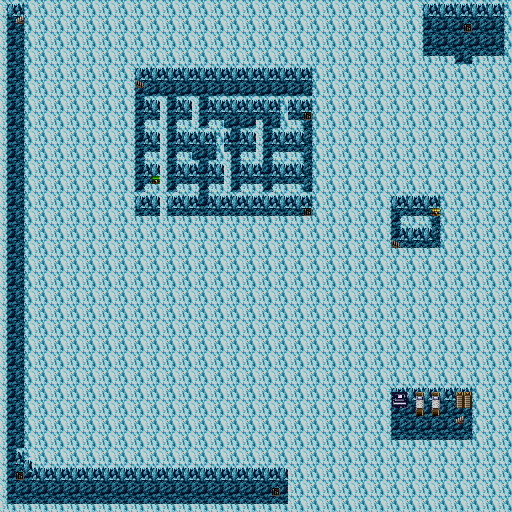
A chest in Tamayo's cave is an object with two pages:
- Page 1: a closed chest (graphic 36), start search. Sound effect 1, a message saying what was inside, item +, and switch on 151.
- Page 2, condition switch 151: an open chest (graphic 37), start search. A message: the chest is empty.
Opening it turns on the switch, which makes page 2 the page in force: the chest shows open, and searching it again gives nothing. Every chest needs its own switch; without one it could be emptied again and again. The cave's other chest uses switch 150.
A locked door#
In the academy's cellar, a door is an object with three pages:
- Page 1: a closed door (graphic 62), start search. A message: the door is locked.
- Page 2, condition item: the angel's key. Still the closed door, search. A message that the key opened it, switch on 38, and a sound.
- Page 3, condition switch 38: an open door (graphic 63), start touch, no commands. The party walks through.
Page 2 outranks page 1 as soon as the key is in the bag, and page 3 outranks both once the door is open. The key isn't taken: it could open other doors. The same can be done with a key item and a key start method; the sample never uses them.
A boss: automatic pages in a chain#
Tamayo's mansion runs a whole fight scene through a chain of switches, each automatic page turning off its own switch and turning on the next one's. Its henchman Matsumoto shows the pattern in one event, a person with four pages:
- Page 1: touch. A line of dialogue ("What do you want with Lady Tamayo?").
- Page 2, switch 107 (turned on by Tamayo once her own fight is lost), automatic: Matsumoto steps down, turns left to the party, waits half a second, speaks, and battle: himself, an event enemy, with song 9. Then switch on 108 and 110, switch off 107.
- Page 3, switch 108, automatic: he speaks, hands over the jail key with a sound and a message, item + the key, switch on 109, switch off 108.
- Page 4, switch 109, talk: a parting line, for as long as the party cares to ask.
Each automatic page runs once, because it turns off the switch that chose it; the next page's switch is already on, so the scene goes straight on. Switch 110 meanwhile gives Tamayo herself a new page. The battle in the middle of page 2 is just another command: when it is won, the page goes on.
Buying a ship: a page on gold#
In Monja Town, a man in debt will give up his ship to whoever pays his 300,000 gold. His event, a person, has four pages, all talk:
- Page 1: a long scene (debt collectors hammering at the door) and the offer, as a choice. Either answer turns on switch 116.
- Page 2, switch 116: he sighs that nobody will pay.
- Page 3, condition gold 300,000 or more: he asks whether the party means to pay, as a choice. Yes: gold − 300,000, his thanks, item + the conch that calls the ship, switch on 117. No: he gives up.
- Page 4, switch 117: thanks again.
Page 3 needs only the gold, so it outranks page 2 the moment the party is rich enough, with no extra switch; page 4 takes over after paying. One thing to note: a party that arrives with 300,000 gold meets page 3 first and never sees page 1's scene. Adding switch 116 to page 3's conditions would make the scene come first.
Fan-made reference material, one of the Eschaton Games Tsukuru guides. Not affiliated with the publishers of the titles it covers.