Covers Manual pp. 22–27 Manual pp. 56–59 Manual pp. 64–71 Guidebook pp. 134–148.
Graphics catalogue#
Every picture an RT2 game can show is in the cartridge's ROM. You choose graphics by number in the editors, and you can't draw or import your own: RT2 has no graphics editor. This chapter shows all of them, numbered as the editors number them, so that you can pick a graphic here instead of stepping through it in the editor.
Everything on this page was drawn from the ROM by a script, with the same decoders the game uses (Tools/rt2_guide_catalogue.py), and so looks as the game draws it. The guidebook prints the same catalogues in small colour pictures Guidebook pp. 134–148.
| Graphics | How many | Chosen in | Numbered |
|---|---|---|---|
| People | 72 (1 transparent) | Hero Settings, and each page of a person event | 1–72 |
| Objects | 68 for maps, 22 for the field (1 transparent) | Each page of an object event | 1–68, 1–22 |
| Enemies | 83, each in 4 colours | Enemy Settings: グラフィック and カラー | 1–83, colours 1–4 |
| Battle backgrounds | 17 | Not chosen directly: by the map's setting (Dungeon, Town, Castle) and type, or the field's ground | — |
| Magic animations | 23, and none | Magic Editing: グラフィック | なし, then 1–23 |
| Vehicles | 7 (and none) | Hero Settings → Vehicles | 1 none, 2–8 |
| Map parts | 5 sets of 256 | A map's type | — |
| Field parts | 184 island parts | The field editor | — |
| Fonts | 3 | Not chosen: the program's | — |
Character graphics#
The 72 character graphics グラフィック serve both the heroes (Hero Settings) and every person event ひとイベント on a map. Graphic 1 is transparent: a hero or person that is there but not seen. Graphics 2–72 are drawn below, walking.

Each graphic is 16 × 24 pixels in 8 frames: two steps each facing down, left, right and up. A person never shows anything else: there are no extra poses, so a sleeping, sitting or fallen character is drawn by facing and movement alone.
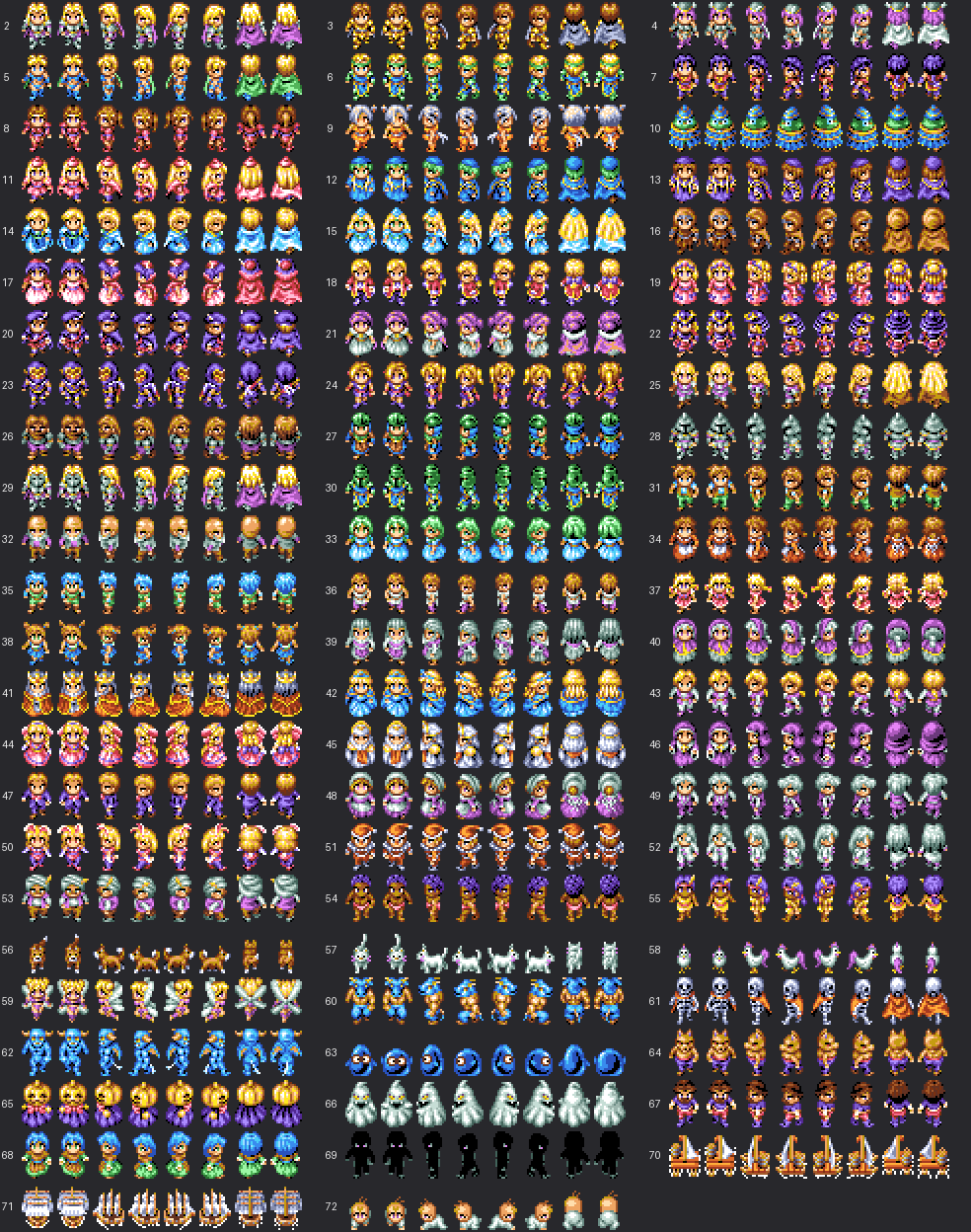
- Numbers: in Hero Settings ↑ and ↓ step the graphic by 1, ← and → by 10 Manual pp. 22–23. The event editor's person graphics are the same numbers.
- Colours are fixed. Each graphic comes with its own sprite palette, chosen by the program; unlike an enemy, a character can't be recoloured.
- The transparent graphic is a tool. The sample game uses it for its blank hero とうめい ("invisible", hero 12), who is the whole party while Dankichi is away, and for invisible people: the shopkeeper is an object you talk to across the counter, and the exits of a map are invisible tiles that warp you when you step on them.
The sample's heroes: だんきち Dankichi is 31, ゴリサク Gorisaku 23, ヌポノスケ Nuponosuke 10, タクヤ Takuya 2, とうめい 1. Its person events use 63 of graphics 2–72; the sample game lists who is who.
Object graphics#
An object event ものイベント (a chest, a door, a sign) shows a 16 × 16 graphic drawn into the map's upper layer rather than a sprite, so objects don't move or face. There are 68 object graphics for maps and 22 for the field, the same whatever the map's type Guidebook pp. 70–71; graphic 1 is transparent in both.
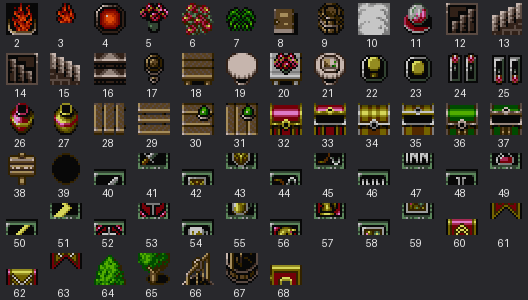

The numbers that matter most, from the guidebook's list and the sample's use:
| Graphic | What it shows | The sample uses it for |
|---|---|---|
| Maps | ||
| 1 | Nothing (transparent) | Counters you talk across to shop, and the invisible tiles at a map's exits that warp you out |
| 10 | A futon | Beds you can rest in, and a dirty futon in the well |
| 12–15 | Stairs up and down | Every staircase: a touch, effect 45 and a warp |
| 27 | A pot | Pots searched in the well |
| 32, 34, 36 | Chests A, B, C, closed | Every chest |
| 33, 35, 37 | The same chests, open | |
| 38 | A signboard | A sign in the academy |
| 53 | A well | The academy's well |
| 54, 56, 58, 60, 62, 64 | Doors A–F, closed | Doors; door E (62) for the two locked ones |
| 55, 57, 59, 61, 63, 65 | The same doors, open | |
| The field | ||
| 9 | A signboard | Signs to search |
| 20–22 | Castles A–C (wide: leave a cell free beside them) | The high school (20) |
Enemy graphics#
83 enemy graphics, each in 4 colours カラー Manual pp. 64–65. They are drawn here in colour 1, numbered as Enemy Settings numbers them. Graphic 1 is blank: an enemy that can't be seen.
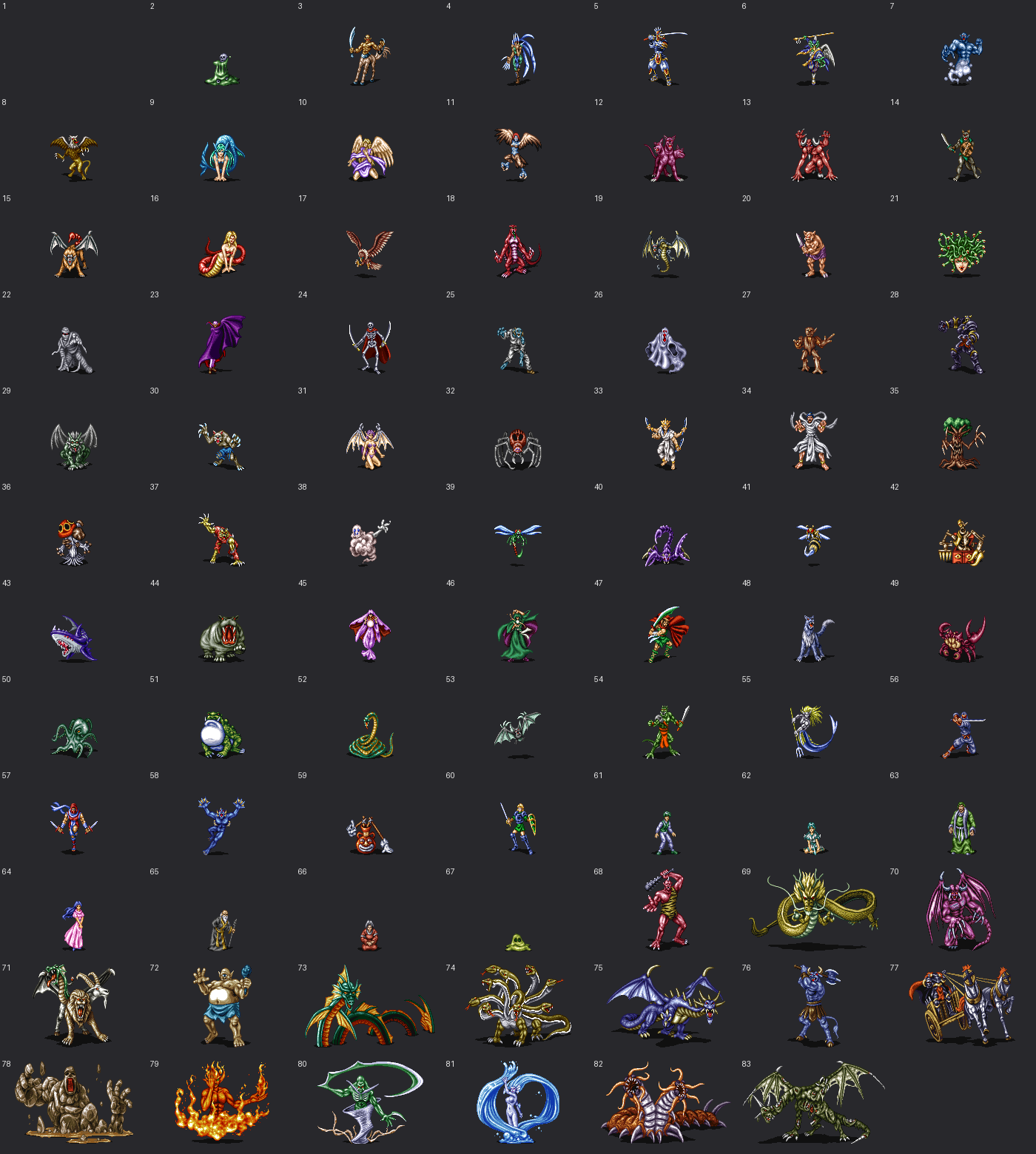
The last sixteen, 68–83, are the large ones, all 112 pixels tall and up to 192 wide: the guidebook counts 16 boss graphics Guidebook pp. 12–13. The others are 24 to 80 pixels tall and 32 to 64 wide.
The colours change the palette only, never the drawing. Each enemy in a battle gets a palette of its own, so the same graphic can appear in two colours side by side.
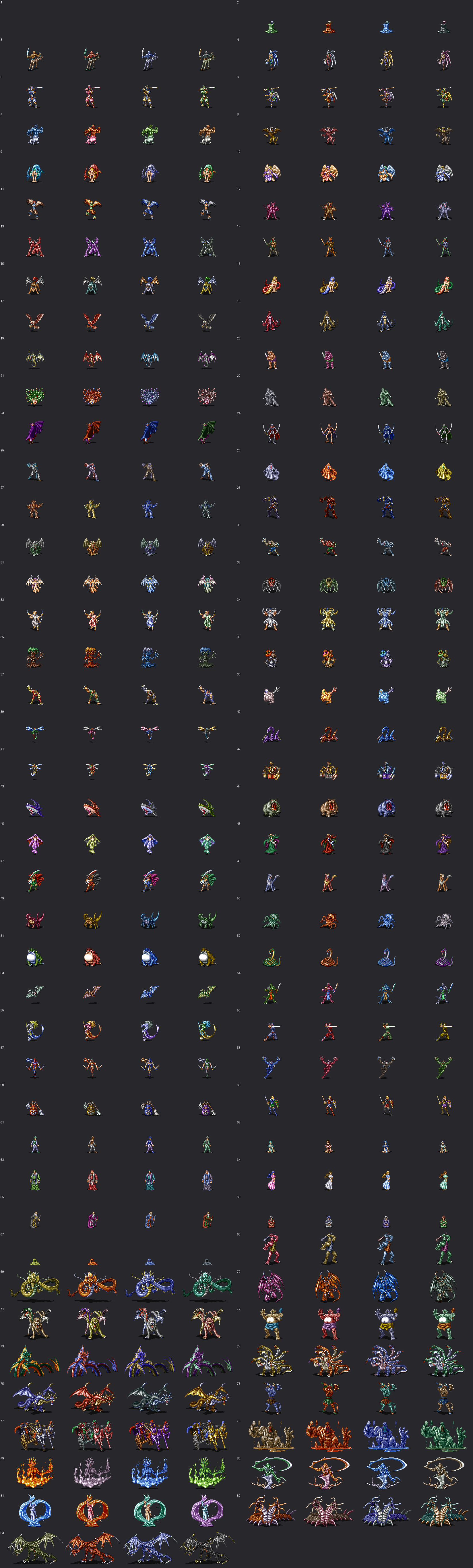
Size limits a group. The battle lines its enemies up side by side across the screen, 256 pixels, and leaves out any that don't fit (How battles work). So four 64-pixel enemies fit, but one of the widest bosses leaves room for nothing beside it. The sizes:
Every enemy graphic's size, and the sample's enemies that use it
| Graphic | Size (pixels) | The sample's enemies on it (colour) |
|---|---|---|
| 1 | blank | |
| 2 | 48 × 48 | ドロドロ (2) |
| 3 | 56 × 80 | |
| 4 | 48 × 72 | |
| 5 | 64 × 80 | |
| 6 | 56 × 72 | カラスてんぐ (4) |
| 7 | 56 × 72 | ケムールン (1) |
| 8 | 64 × 64 | |
| 9 | 64 × 64 | マーメイド (4) |
| 10 | 64 × 64 | エンジェル (2) |
| 11 | 64 × 72 | |
| 12 | 64 × 64 | |
| 13 | 64 × 72 | うしあたま (2) |
| 14 | 56 × 72 | |
| 15 | 64 × 64 | ライオンマン (3) |
| 16 | 64 × 64 | |
| 17 | 64 × 64 | |
| 18 | 64 × 72 | |
| 19 | 64 × 64 | |
| 20 | 48 × 64 | ブタゴリラン (2) |
| 21 | 64 × 64 | ヘビ女 (3) |
| 22 | 64 × 64 | ミイラン (1) |
| 23 | 64 × 80 | |
| 24 | 56 × 72 | 氷ガイコツ (3) |
| 25 | 56 × 64 | ゾンビラー (2) |
| 26 | 56 × 64 | ぼうれい (3) |
| 27 | 56 × 64 | モックリコン (1) |
| 28 | 64 × 80 | |
| 29 | 64 × 64 | スラッシュ (4) |
| 30 | 64 × 64 | バケニャンピー (4) |
| 31 | 64 × 64 | コスプレーラ (1) |
| 32 | 64 × 56 | タランチュー (3) |
| 33 | 56 × 72 | ナイフつかい (2) |
| 34 | 64 × 80 | ギブミーおとこ (4) |
| 35 | 64 × 72 | グリーングリーン (1) |
| 36 | 48 × 64 | キノッパ (4) |
| 37 | 64 × 72 | |
| 38 | 56 × 64 | |
| 39 | 64 × 56 | ビービー (3) |
| 40 | 64 × 56 | |
| 41 | 48 × 56 | |
| 42 | 64 × 64 | いいもの (3) |
| 43 | 64 × 64 | シャークン (3) |
| 44 | 64 × 64 | |
| 45 | 56 × 72 | うらないし (2) |
| 46 | 56 × 72 | まほうつかい (3) |
| 47 | 64 × 80 | 悪の剣士 (3) |
| 48 | 56 × 64 | オオカミ (4) |
| 49 | 64 × 64 | カニボコ (4) |
| 50 | 64 × 56 | タコリン (2) |
| 51 | 64 × 64 | タンタラス (2) |
| 52 | 64 × 64 | |
| 53 | 64 × 64 | バットー (2) |
| 54 | 64 × 72 | |
| 55 | 64 × 72 | |
| 56 | 64 × 64 | ニンジャくん (3) |
| 57 | 64 × 72 | おどりこしぼう (4) |
| 58 | 64 × 80 | ギギ (3) |
| 59 | 64 × 56 | ガラクターニャ (2) |
| 60 | 48 × 72 | さまよい人 (4) |
| 61 | 40 × 64 | チェリーボーイ (3), ムカツクがき (2) |
| 62 | 40 × 48 | トラベラー (2) |
| 63 | 40 × 72 | はぐれけいじ (4) |
| 64 | 32 × 72 | モモグリ (1) |
| 65 | 40 × 56 | えんちょうセンセ (3) |
| 66 | 40 × 48 | タマヨババア (4) |
| 67 | 40 × 24 | ボゲロー (2) |
| 68 | 64 × 112 | |
| 69 | 176 × 112 | |
| 70 | 96 × 112 | |
| 71 | 112 × 112 | |
| 72 | 80 × 112 | ハラポン (2) |
| 73 | 176 × 112 | |
| 74 | 144 × 112 | |
| 75 | 160 × 112 | ドラゴンあにき (3) |
| 76 | 72 × 112 | |
| 77 | 144 × 112 | ユーレイばしゃ (3) |
| 78 | 160 × 112 | ゴーレム (4) |
| 79 | 128 × 112 | 火炎人 (1) |
| 80 | 144 × 112 | マツモト (1) |
| 81 | 112 × 112 | |
| 82 | 176 × 112 | ゲゲゲムシ (4) |
| 83 | 192 × 112 | ドラゴンブレス (2) |
The sample's own bosses are not the big graphics: the teacher モモグリ uses 64, the principal 65 and the cave's Tamayo 66, human-sized figures.
Battle backgrounds#
17 battle backgrounds. You don't pick one by number: the battle chooses it from where it happens (Maps and the field).
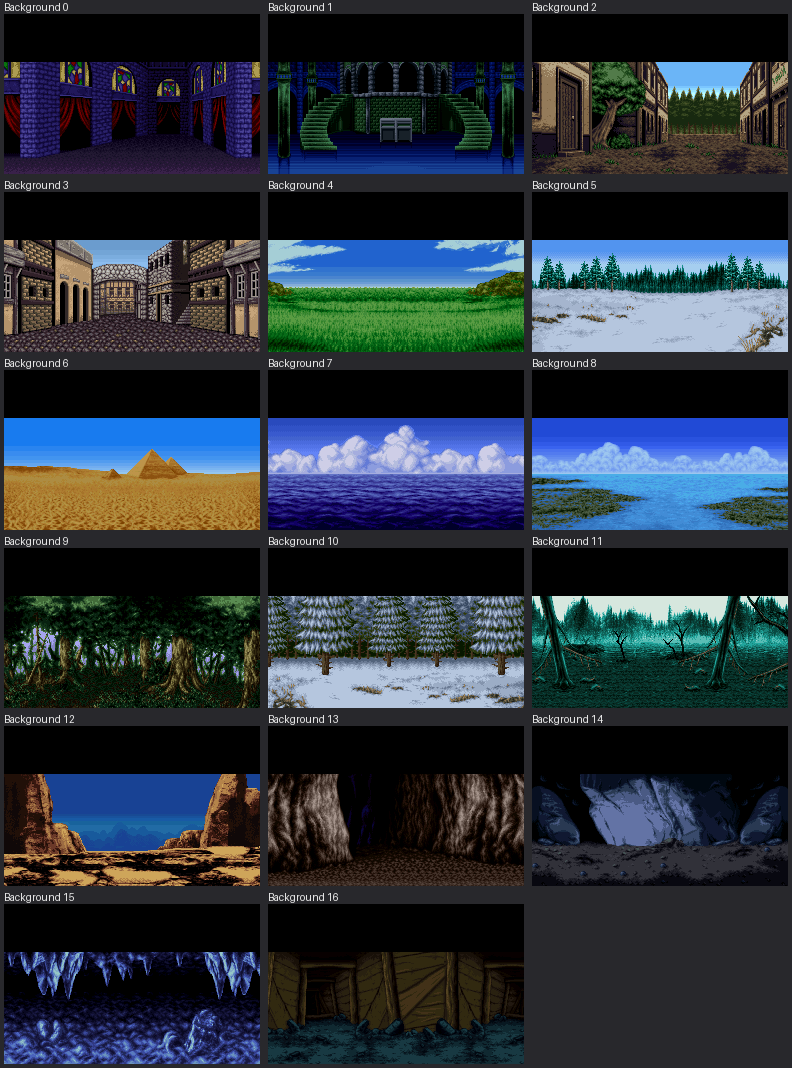
- On a map, Enemy Map Editing sets each map to one of three settings: Dungeon ダンジョン, Town まち or Castle しろ Manual pp. 68–69. Town and Castle pick one of their two backgrounds at random for each battle. Dungeon picks by the map's type: ice cave, forest, rock cave, earth cave or wooden interior.
- On the field the ground under the party decides, and a mountain on any side of the party makes it the rocky canyon.
| No. | Scene | Where the game uses it | In the sample |
|---|---|---|---|
| 0 | Castle hall | A map set to Castle しろ (0 or 1 at random) | The academy's cellar |
| 1 | Castle stairs | A map set to Castle (0 or 1 at random) | The academy's cellar |
| 2 | Town edge | A map set to Town まち (2 or 3 at random) | |
| 3 | Town street | A map set to Town (2 or 3 at random) | |
| 4 | Grassland | The field: grass, cliff edges | The field |
| 5 | Snowfield | The field: snowfield, snowy mountains | The field |
| 6 | Desert | The field: desert | The field |
| 7 | Sea | The field: sea and deep water (by ship) | The field |
| 8 | Shallows | The field: shallow water, rocky shallows | The field |
| 9 | Forest | The field: forest. A Dungeon map of the Outside type | The field; the Devil's Forest |
| 10 | Snowy forest | The field: snowy forest | The field |
| 11 | Swamp | The field: swamp | The field |
| 12 | Rocky canyon | The field: mountains, and any battle with a mountain next to the party | The field |
| 13 | Cave (earth) | A Dungeon map of the Earth type | |
| 14 | Cave (rock) | A Dungeon map of the Stone type | |
| 15 | Ice cave | A Dungeon map of the Ice type | Tamayo's cave; the well |
| 16 | Wooden interior | A Dungeon map of the Wood type |
Magic animations#
23 animations, chosen per spell in Magic Editing's グラフィック Manual pp. 56–59. Click one to play it (the black pause after each is added here, so that a loop reads as one cast).


The 23 magic animations at twice their size, as the battle plays them over a target.
- Numbering. The editor's first choice, なし (none), is number 0 and still plays a blank sprite and a sound. The animations are 1–23.
- Which spells have one. Only the 11 hostile effects take an animation: poison, paralyse, seal, confuse, sleep, knock out, the three stat-downs and the two damage effects Manual pp. 56–59. The sample game's spells agree: every spell of those effects has one, and every other has none. A spell without one (healing, the stat-ups, revive, teleport, cure) makes its target blink instead, with sound effect 49.
- Each animation has its own sound: animation n plays effect n + 1, and なし plays effect 1 (Music and sound).
- All 23 share one palette, and they are drawn over the target, still: any motion is drawn into the frames. With several targets the copies take turns a frame each, so an all-enemy spell flickers.
| Animation | Length | Its sound | The sample's spells with it |
|---|---|---|---|
| None なし | a blank sprite for 2 frames | 1 | コギャルハンター |
| 1 | 0.9 s | 2 | どくどくこうげき |
| 2 | 1.0 s | 3 | マヒマヒこうげき |
| 3 | 1.5 s | 4 | チャックこうげき |
| 4 | 1.5 s | 5 | バッタリこうげき |
| 5 | 1.1 s | 6 | ネムネムこうげき |
| 6 | 0.4 s | 7 | ねこパンチ |
| 7 | 1.3 s | 8 | アワアワこうげき |
| 8 | 0.4 s | 9 | よわくなれ, やわらかくなれ, おそくなれ |
| 9 | 1.5 s | 10 | かえんベイベー |
| 10 | 2.2 s | 11 | |
| 11 | 1.8 s | 12 | ばくはつアムール |
| 12 | 0.7 s | 13 | |
| 13 | 0.9 s | 14 | |
| 14 | 1.0 s | 15 | カミナリおやじ |
| 15 | 0.6 s | 16 | ラブリーチョップ |
| 16 | 0.5 s | 17 | うまなみキック |
| 17 | 1.8 s | 18 | なだれギャル |
| 18 | 0.5 s | 19 | しろくまエルボー |
| 19 | 2.4 s | 20 | |
| 20 | 1.2 s | 21 | |
| 21 | 0.6 s | 22 | |
| 22 | 0.6 s | 23 | |
| 23 | 1.3 s | 24 | はらじゅくビーム |
Vehicles#
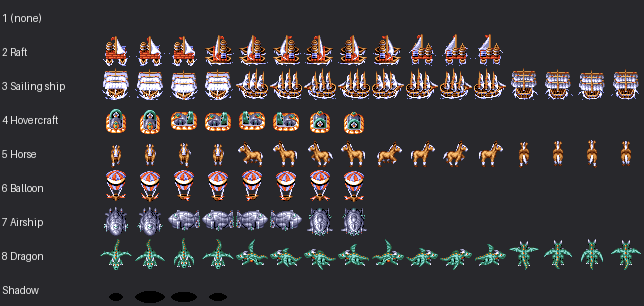
The vehicle editor gives each of the three vehicles one of eight graphics Guidebook pp. 46–47: the first is none (no vehicle), then seven. The graphic is only a look: the slot (land, sea, air) decides where a vehicle goes, so a dragon can sail and a raft can fly (The database).


The seven vehicle graphics, walking or flying in each facing. Numbered as the vehicle editor numbers them, 2–8, after 1, none.
| Graphic | Japanese | Vehicle | Frames | In the sample |
|---|---|---|---|---|
| 1 | None: the slot has no vehicle | |||
| 2 | いかだ | Raft with a sail | 12, three a facing | The sea vehicle |
| 3 | 帆船 | Three-masted sailing ship | 16, four a facing | |
| 4 | ホバークラフト | Hovercraft | 8, two a facing | |
| 5 | 馬 | Horse | 16 | The land vehicle |
| 6 | 気球 | Striped balloon | 8 | The air vehicle |
| 7 | 飛空艇 | Silver airship | 8 | |
| 8 | ドラゴン | Green dragon | 16 |
A vehicle is 32 × 32 pixels. With 16 frames, four go to each facing; the 8-frame ones have two a facing. A ninth sheet holds the air vehicle's shadow, four ellipses, small to large, drawn under it in flight.
Map parts#
A map is built from parts パーツ: blocks of 4 × 4 cells (64 × 64 pixels). Each of the five map types has its own set of 256 parts Guidebook pp. 56–57, and a map uses its type's set alone (Maps and the field). The sheets below show each set's 256 parts, 16 to a row, numbered from the top left, at half size.
The ice, stone, earth and wood sets are laid out alike: a part number is the same kind of piece in each, a wall corner, a floor or a table, in that set's material. That is why changing a map's type re-skins the whole map without breaking it. The outside set is laid out on its own, with houses, trees and fields.
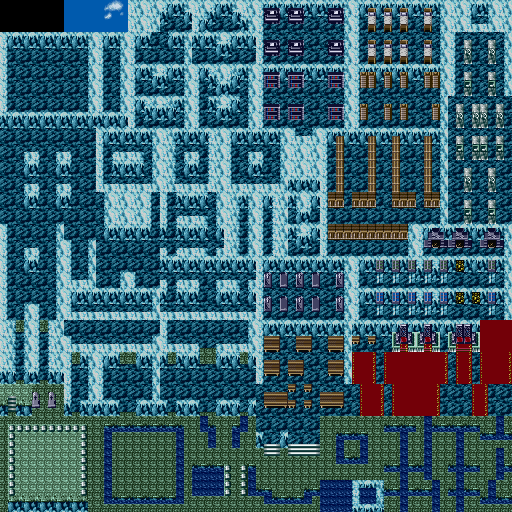
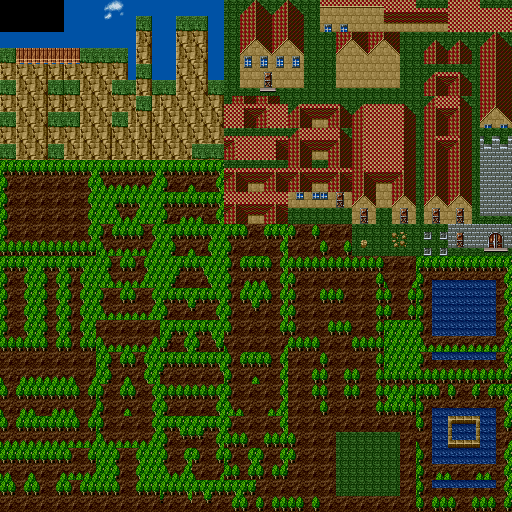
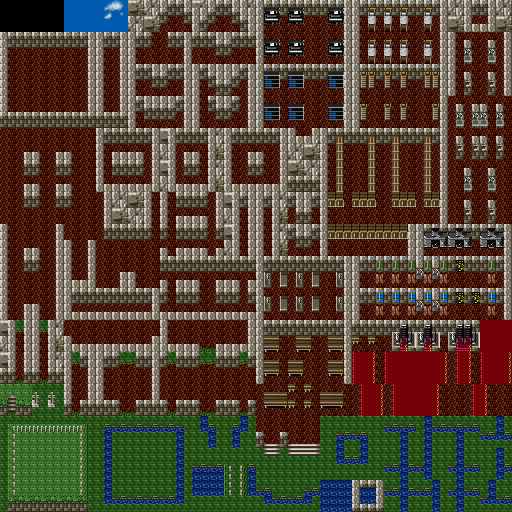
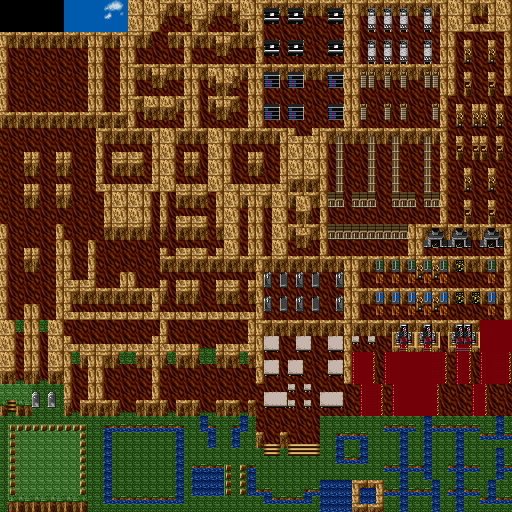
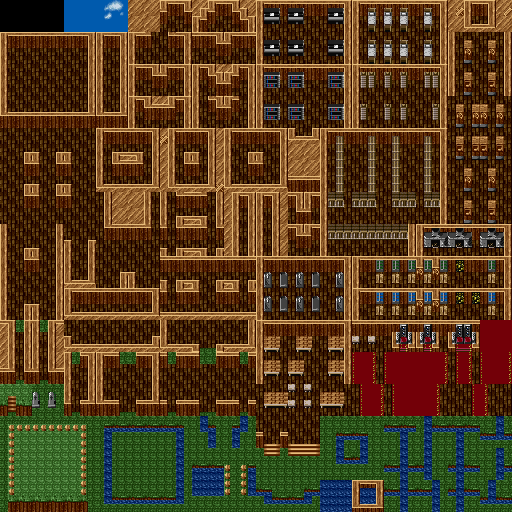
The sets are given in the order the program numbers the types (ice 0, outside 1, stone 2, earth 3, wood 4), which is also the order of their BGM slots; a new, empty map is of the ice type. Some colours in each set cycle while a map is shown, so water ripples.
The field#
The field has a seventh set: 184 island parts しまパーツ Guidebook pp. 142–143, each covering 2 × 2 screens of coastline or land, laid on the field in the field editor (Maps and the field). They are made from 145 chips of 16 × 16 pixels, drawn here; the field's sea and some of its land colours cycle in play.
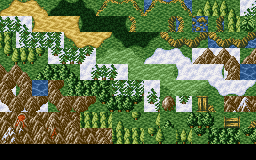
The sample game shows a whole field built from them.
Fonts#
The program draws all its text in three fonts of its own, which a game can't change. Each sheet is drawn by rt2_text.py font.
- The proportional font: the menus, the editors, the name keyboard and the captions. Glyphs are 16 pixels tall and 1–12 wide, most kana and kanji 11.
- The shadowed 8 × 8 font: the battle (the status windows, enemy names, commands) and the small text of the menus and editors.
- The plain 8 × 8 font: a few editor windows, such as the field editor's.
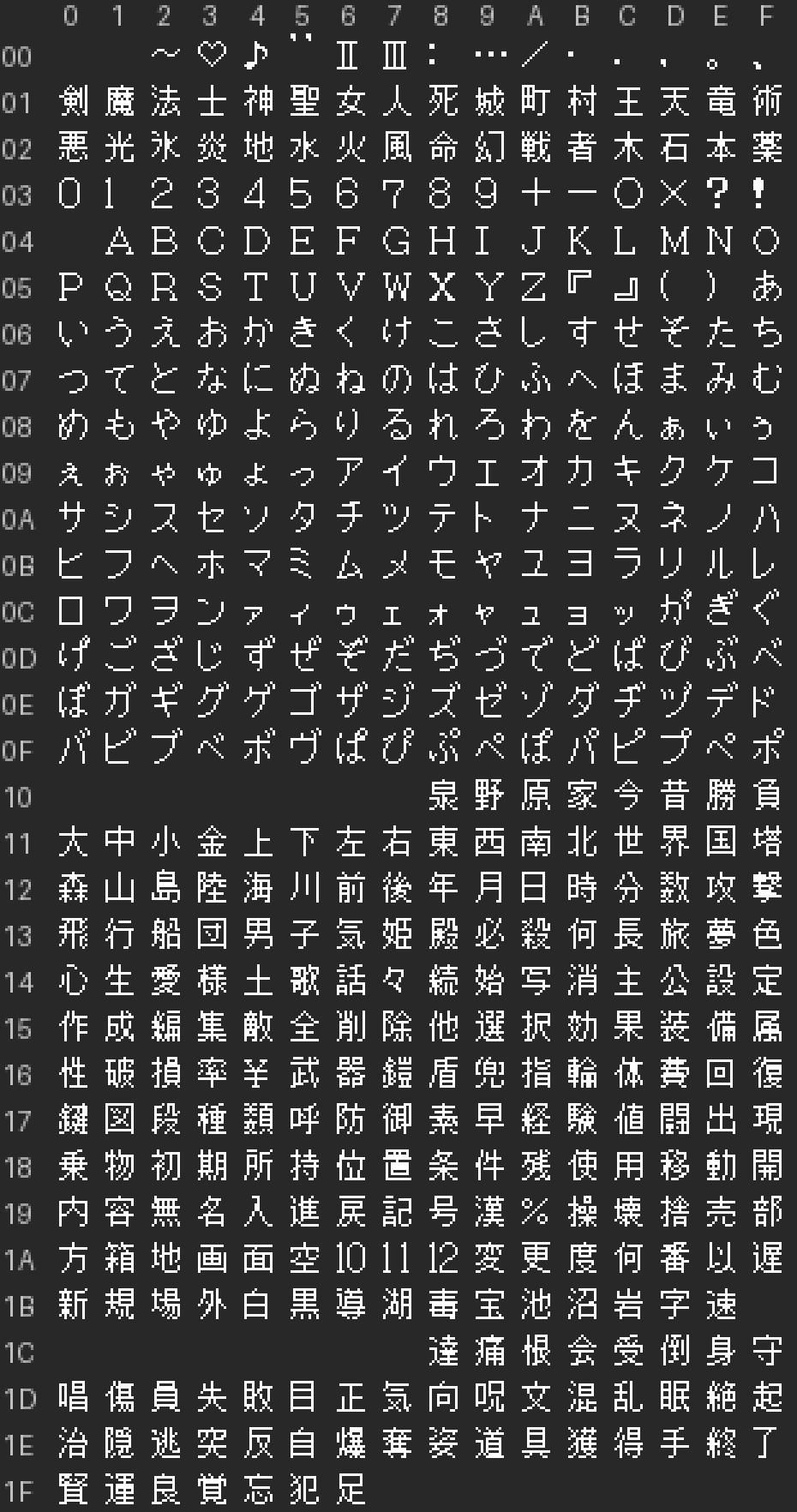
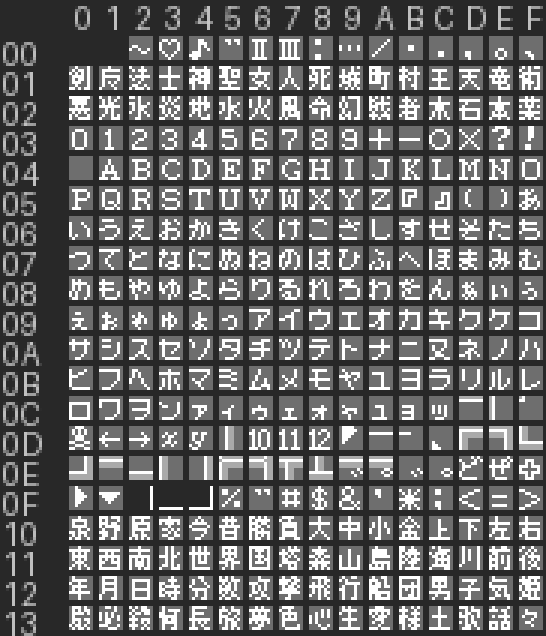
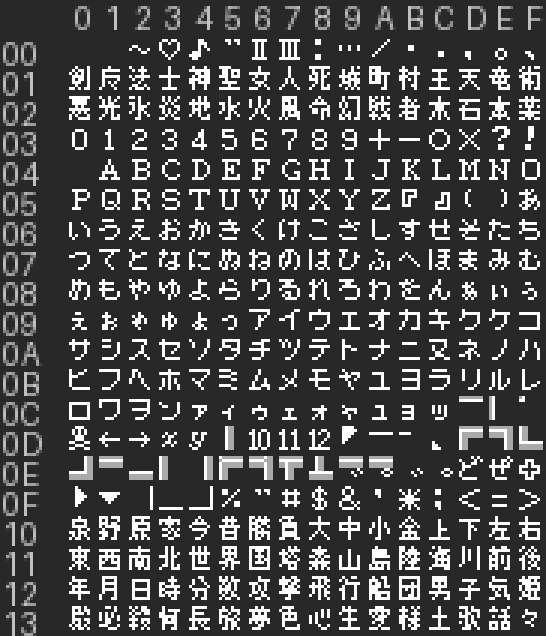
What you can type in a name or a message: hiragana, katakana, the digits, some marks and 96 kanji, a first set of 32 and 64 more after them (Getting started). The guidebook lists only the first 32 Guidebook pp. 38–39. The 8 × 8 fonts have the same characters as tiles, so names typed in the editor also show in battle.
Graphics you can't add#
Nothing in RT2 lets you draw. The one way in for new graphics was the memory pack: the Data page's メモリーパックのグラフィックデータ選択 (choose graphics data from a memory pack) names a graphics file on the pack, and the game then takes from it:
- map types beyond the five (their parts, chips and colours), played with the BGM slot その他 (other);
- enemy graphics beyond the 83;
- battle backgrounds from 17 on;
- other colours for the character graphics.
Such files were to be broadcast by St.GIGA to Satellaview owners Manual p. 72. No graphics file is known to survive, and none is in the ROM, so what one held beyond its table of contents is unknown. How it works gives what the program reads from one.
Fan-made reference material, one of the Eschaton Games Tsukuru guides. Not affiliated with the publishers of the titles it covers.