Covers Manual pp. 28–33 Manual pp. 68–71.
Maps and the field#
An RT2 game takes place on two kinds of map. The field フィールド is the world: one large map of islands, seas and mountains that the party crosses on foot or by vehicle. Dungeon maps ダンジョン are everything else, towns, castles, houses and caves alike: up to 128 of them, each up to 64 × 64 cells. Both are made in Map Making マップの作成 on the Edit menu; who and what stands on them is added afterwards in Event Making, and which monsters lurk there in Enemy Map Editing 敵マップの編集 (below).
Maps are not drawn cell by cell. To fit a whole game into 64 KB of battery memory, RT2 builds them from ready-made pieces in three steps, and you only ever choose the largest pieces.
Chips, parts and screens#
- A chip is one 16 × 16 pixel cell, the size of a person. Positions on a map (events, warps, the start) count chips.
- A part パーツ is a block of 4 × 4 chips, 64 pixels square: a corner of wall, a bed and its floor, a stretch of river. Parts are fixed in the ROM, 256 of them for each map type.
- A screen 画面 is 4 × 4 parts, 256 pixels: exactly one TV screen. This is what you draw, choosing a part for each of its 16 places.
- A dungeon map is up to 4 × 4 screens. The field is up to 16 × 16 screens, made of island parts しまパーツ, each 2 × 2 screens.
| Level | Size | Made of | Who chooses it |
|---|---|---|---|
| Chip | 16 × 16 pixels, one cell | Drawn in the ROM | Fixed. Events and the party stand on chips, and positions count chips |
| Part | 4 × 4 chips, 64 pixels | 16 chips | Fixed: 256 parts in each map type, 184 island parts for the field |
| Screen | 4 × 4 parts, 256 pixels (16 × 16 cells): one TV screen | 16 parts | You, part by part, in Map Making |
| Dungeon map | Up to 4 × 4 screens, 64 × 64 cells | Screens from the shared pool of 300 | You: up to 128 maps |
| The field | 4 × 4, 8 × 8 or 16 × 16 screens, up to 256 × 256 cells | Island parts, each 2 × 2 screens | You: one field |
The manual covers Map Making on Manual pp. 28–33.
Dungeon maps and the pool of 300 screens#
A dungeon map is a grid of 4 × 4 screens, but it needn't fill it. Every screen you draw on is taken from one pool of 300 screens shared by all 128 maps; the screens you leave empty cost nothing. A house can be a single screen, a castle all sixteen. The map list shows each map's screens in use and how many of the 300 are left 残り画面. The field doesn't draw on the pool.
The sample game uses 165 screens over its 22 maps, leaving 135. The academy's cellar fills all 16 screens of its grid; the other maps use from 1 to 14.
What a map shows where nothing is drawn is its fill part 下地, one part of the map's own type that you choose for each map. It is drawn:
- past the map's edges, wherever the view reaches beyond them;
- in every screen of the 4 × 4 grid that isn't in use;
- wherever part 001, plain black, stands in a screen that is in use.
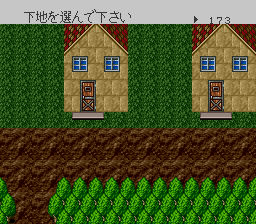
So a building that stands in darkness wants a black fill part, and a forest path one of trees or wall, so the map seems to go on. A map's edges are hard: the party can't walk off a dungeon map, it leaves by a warp (below).
The five map types#
Each dungeon map has a type タイプ, which picks its set of 256 parts, its colours and, through the BGM settings, its music: the five map-type slots on the Hero Settings BGM page play on maps of that type (The BGM slots). A map can't mix types. Changing a map's type keeps its part numbers and redraws them from the new set, so a map is all one material Manual pp. 32–33 Guidebook pp. 54–57.
| Type | On screen | What it looks like | Made for | The sample's maps of this type |
|---|---|---|---|---|
| Ice | こおり | Pale blue walls and frosted floors | Ice caves, frozen towers | Tamayo's cave, the well, the old man's hut, the opening |
| Outside | そと | Houses and roofs, castle towers, hedges and trees, fields, ponds | Streets, villages, forest paths | Dankichi's village (outdoors), the beach, the devil's forest |
| Stone | いし | Grey block walls on dark red floors | Castles, schools, halls | The high school, the academy's cellar, the hotel, the tower |
| Earth | つち | Sandy rock walls on brown floors | Caves, cellars, desert towns | Monja Town, the Luxor pyramid |
| Wood | き | Wooden walls and plank floors | Houses, inns, shops | Dankichi's village (indoors), the Tsukuru academy and its classrooms |
Ice, stone, earth and wood are laid out alike: a part number gives the same piece (a wall corner, a bed, a flight of stairs) in each, drawn in that type's material. So a dungeon drawn as stone becomes an ice palace or a wooden house by changing its type. Outside is a set of its own: house fronts, roofs, castle towers, trees, fields and ponds. An empty map slot is ice.
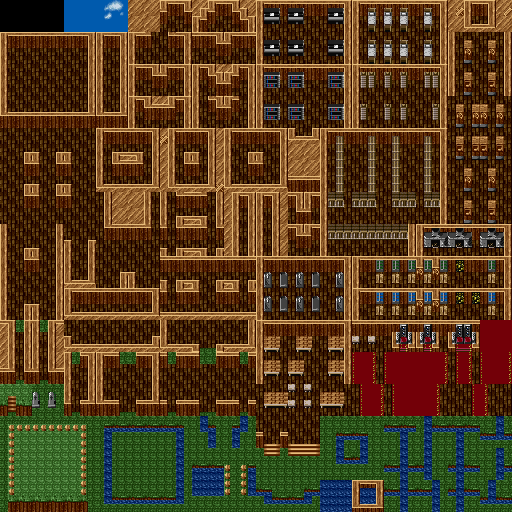
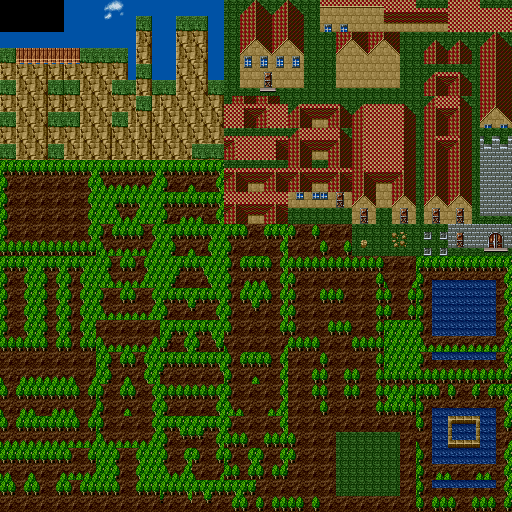
All five sets, and the field's chips, are in the graphics catalogue. The editor's type list goes on past the five to そのた1–そのた4 ("other"): slots for part sets from a memory pack, with their own BGM slot. Such sets were planned for broadcast over the Satellaview and none is known to survive (Behind the scenes).
Map Making: dungeon maps#
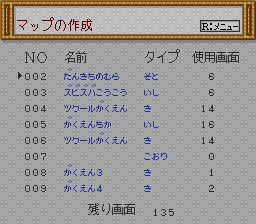
Map Making opens on the list of the 128 maps. Each row gives the map's number, its name (up to 8 characters), its type and the screens it uses. Above map 001 is a row for the field (below); the list wraps round, so map 128 shows above it.
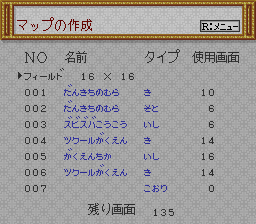
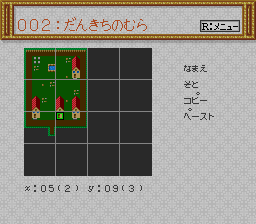
Choosing a map shows its 4 × 4 grid of screens, with a side menu to name it, set its type, and copy and paste. Choosing a screen opens it: a cursor moves over its 16 parts, and the screen's part number and the position are shown.
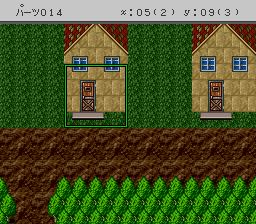 12345
- 1 Part to place パーツ014 the part selected for placing; X opens the part picker on it, whatever the cursor is over
- 2 Cursor x x:05(2) the cursor column in parts, 1-16, with the screen 1-4 in brackets
- 3 Cursor y y:09(3) the cursor row in parts, 1-16, with the screen 1-4 in brackets
- 4 The part cursor one part: 4 x 4 chips of 16 x 16 pixels
- 5 The map the map at full size, drawn from its parts; a screen is 4 x 4 parts
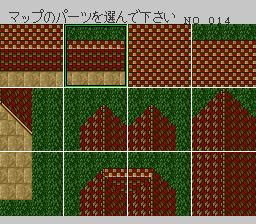
Parts come from a picker that shows 4 × 4 of the type's 256 at a time, numbered 001–256; R sets the map's fill part Manual pp. 32–33. Save the map from the editor's R menu, like every editor's work (Getting started).
The field#
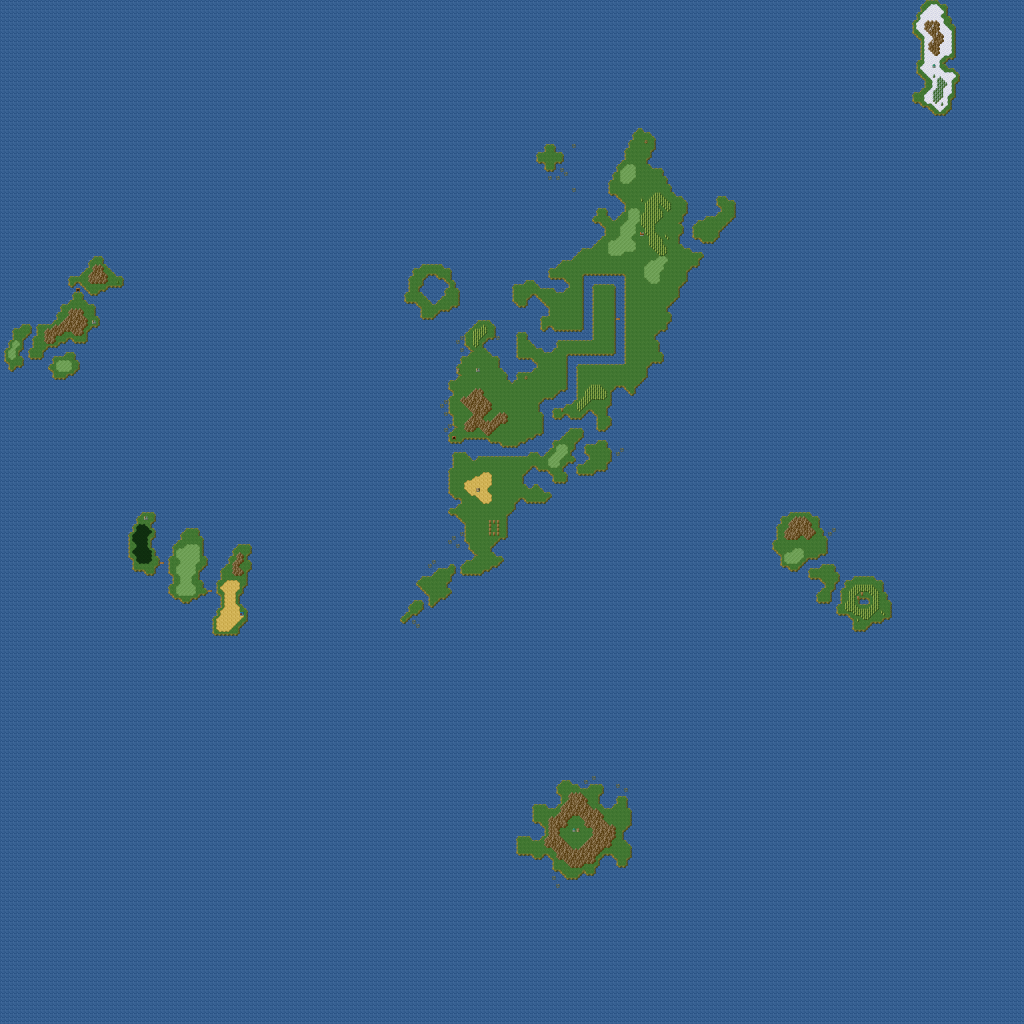
The field is the game's world map. Choose its row above map 001 in Map Making.
- Its size is set from the R menu's フィールドサイズ: 16 × 16 screens (256 × 256 cells, the most and the default), 8 × 8 or 4 × 4 Guidebook pp. 12–13 Guidebook pp. 58–59. The manual's own tutorial makes a 4 × 4 field Manual pp. 30–31.
- It is built from island parts, not drawn part by part. Each island part is a ready-made piece of land and sea 2 × 2 screens across (32 × 32 cells), the size of the field editor's cursor Manual pp. 30–31: a stretch of coast, a mountain range, a lake, open sea. There are 184 of them, and a 16 × 16 field holds 8 × 8 of them.
- It has no edges. Walking off one side brings the party in at the other: the field wraps round at its size, so a ship can sail round the world.
- The field has events like any map (towns and caves are events on it), but no type and no fill part.
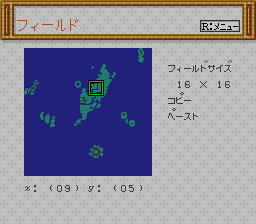
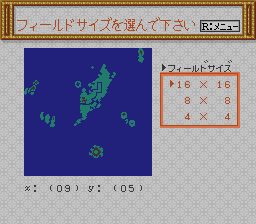
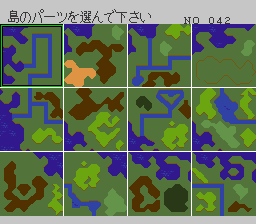
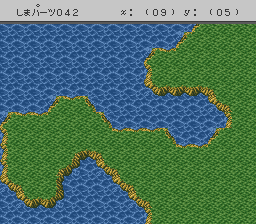
Island parts are chosen from a picker of 3 × 3. L offers the parts that join on in a chosen direction, so a coastline can be carried on from one part to the next, and R shows a part full size, as the party will walk it Manual pp. 30–31. The R menu also copies and pastes.
Walking: what blocks and what doesn't#
Every chip has a fixed attribute that decides who may cross it; you choose it only by choosing the part.
- On a dungeon map a chip is either open (floors, grass, carpets) or blocked (walls, trees, furniture). People block the way too.
- On the field each chip is one of a dozen kinds of ground. The kind decides who may cross it, where the air vehicle may land, which battle background a random battle shows, and whether it hurts:
| Ground on the field | On foot and horse | Ship | Air vehicle lands | Battle background |
|---|---|---|---|---|
| Grass | yes | yes | Grassland | |
| Forest | yes | Forest | ||
| Snowy forest | yes | Snowy forest | ||
| Snowfield | yes | yes | Snowfield | |
| Desert | yes | Desert | ||
| Swamp (1 HP a step on foot) | yes | Swamp | ||
| Shallow water between banks | yes | Shallows | ||
| Sea and deep water | yes | Sea | ||
| Rocky shallows | Shallows | |||
| Mountains | Rocky canyon | |||
| Snowy mountains | Snowfield | |||
| Cliff edges | Grassland |
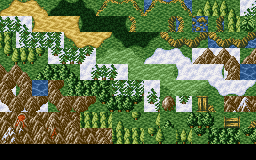
- The horse (the land vehicle) goes where the party can walk, and meets no monsters and takes no swamp damage on the way. The ship sails the sea and the deep water only, and lands the party by stepping onto open ground. The air vehicle flies over everything and comes down only on grass or snowfield. See Vehicles for boarding and calling them.
- Swamps hurt: each step on foot costs every hero 1 HP, never taking anyone below 1, as poison does.
- In test play, holding B walks through anything (Test play).
Connecting maps#
Maps are joined only by warp events ばしょ いどう: an event that, when the party touches it, moves them to a cell of another map or of the field Manual pp. 42–43. A town on the field is an object event with a town graphic and a warp to the town's map; the town's way out is an event (often invisible) on its edge that warps back to the field. Events has the command, and the examples show how the sample builds stairs and exits.
- A warp fades out, moves the party and fades in. If the new map's music differs, it starts.
- The start of the game is a place too: the party's start map and cell are set on Hero Settings' party page, and the sample starts on an empty one-screen map whose only event is its opening (Events).
- Teleport (a spell) only lists places the party has entered by a field event, and lands them on that event's cell. A town entered only by some other route never appears in the list.
- The sample returns the party from a cave onto the cave's own entrance on the field: arriving there by warp doesn't start the entrance again; only stepping onto it does.
Enemy maps#
Random battles are set in Enemy Map Editing, separately from drawing: for each screen of the field and of every map, which monsters can appear there and how often. A screen left with no monsters ticked, or at rate 0, has no random battles.
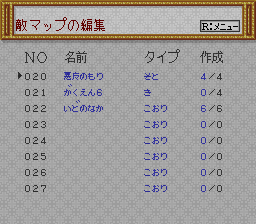
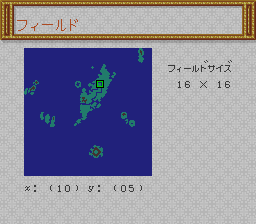
The list starts with the field and goes on with the maps. Choosing the field shows the whole world in miniature, a cursor on one screen:
 123456
- 1 The field フィールド the first entry in the enemy-map list; maps follow
- 2 The field in miniature one 8 x 8 square per screen; encounters are set per screen
- 3 The cursor A shows the screen, A again its enemies (1-32) and rate
- 4 Field size フィールドサイズ 16 × 16 set in the map editor: 16 x 16, 8 x 8 or 4 x 4 screens
- 5 Cursor x x: (10) the screen column, 1-16
- 6 Cursor y y: (05) the screen row, 1-16
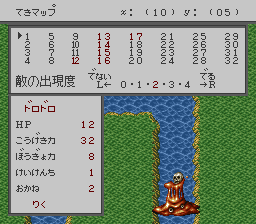
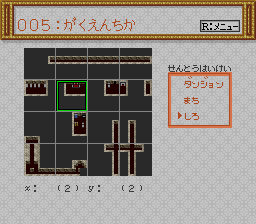
- Which monsters. The field's screens choose from the 32 field enemies, a dungeon map's screens from the 32 dungeon enemies; press A on an enemy to tick it Manual pp. 68–69. The 32 event enemies are only fought from an event's battle command. On the field each enemy's land / sea setting in Enemy Settings decides where it appears: on foot only land enemies are drawn, on the ship only sea enemies. The horse and the air vehicle meet nobody.
- The rate, set with L and R, has nine settings, from 0 to 4 in half steps: 0 is none, 4 the most. Every step rolls for a battle; the first few steps after a battle or a warp are safe, and the chance then climbs the longer the party walks, faster at higher rates. How the roll works is in Battles.
- The group. A random battle draws up to four monsters from the screen's ticked ones (fewer with a small party: one more than the party's size), with repeats, as many as fit across the screen.
- Copy and paste, in the R menu, carry one screen's setting to another Manual pp. 68–69.
Because a dungeon map's settings belong to its screens, a map can be safe in its town screens and dangerous in its cellar.
Battle backgrounds#
A dungeon map is first given a battle setting (R → せんとうはいけい) Manual pp. 68–69: ダンジョン (dungeon), まち (town) or しろ (castle). It picks the background of every battle on the map, random or from an event. On the field the ground under the party picks it.
| Where the battle is | Setting | Background |
|---|---|---|
| A map set to Dungeon ダンジョン | Ice | Ice cave |
| Outside | Forest | |
| Stone | Cave (rock) | |
| Earth | Cave (earth) | |
| Wood | Wooden interior | |
| A map set to Town まち | any type | Town edge or town street, at random |
| A map set to Castle しろ | any type | Castle hall or castle stairs, at random |
| The field | the ground under the party | As in the terrain table above; rocky canyon whenever a mountain is next to the party |
The 17 backgrounds are drawn in the graphics catalogue.
The battle test#
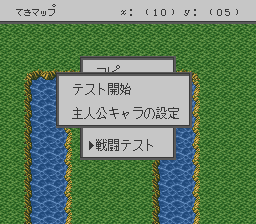
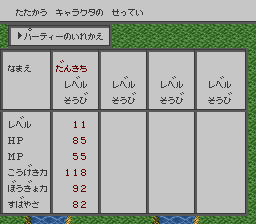
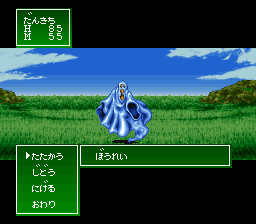
The R menu's battle test 戦闘テスト fights the map's monsters without leaving the editor Manual pp. 70–71. It has two entries: 主人公キャラの設定 sets up the test's own party of up to four heroes, each given a level and five pieces of equipment and kept with the game, and テスト開始 starts a battle. So a dungeon can be tried at the level the player should reach it. The test battle has a fourth command, おわり (end), to stop it.
An example: Monja Town#
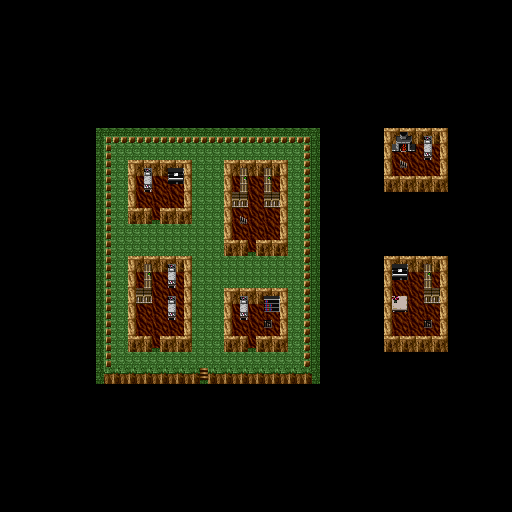
The sample's Monja Town もんじゃタウン is an earth-type map of eight screens, the middle two rows of its grid. Three columns hold the walled town: grass, a fence, and four houses drawn open from above so the party walks in through their doorways. The fourth column holds two small rooms that the town can't reach on foot; stairs in the town warp into them and back. The top and bottom rows are unused, and the map's fill part, black, fills them and the view past the edges.
On it stand the town's events (Events): an inn and two shops, each an object event that the party talks to; a save-point cat; the townspeople; the debtor whose ship the party buys for 300,000 gold (that example); and an invisible warp at the gate back to the field. The town shares the sample's 135 remaining screens and its 43,960 bytes of events with every other map (Limits).
Fan-made reference material, one of the Eschaton Games Tsukuru guides. Not affiliated with the publishers of the titles it covers.